1. Your Command Center: The "My Competitions" tab
It all starts in a centralized place: the "My Competitions" tab. This section has been designed to make managing your competitive life intuitive and fast. Upon entering, you will find three fundamental lists that summarize your activity:
- Active Competitions: Here appear the tournaments in which you are currently participating. You can see at a glance how much time is left and if someone has snatched the first place from you.
- Invitations Received: The mailbox where challenges from your friends arrive. Remember that an unaccepted invitation is a lost opportunity to win a medal.
- Finished Competitions: The historical archive. Here you can check who won past tournaments and relive your old victories.
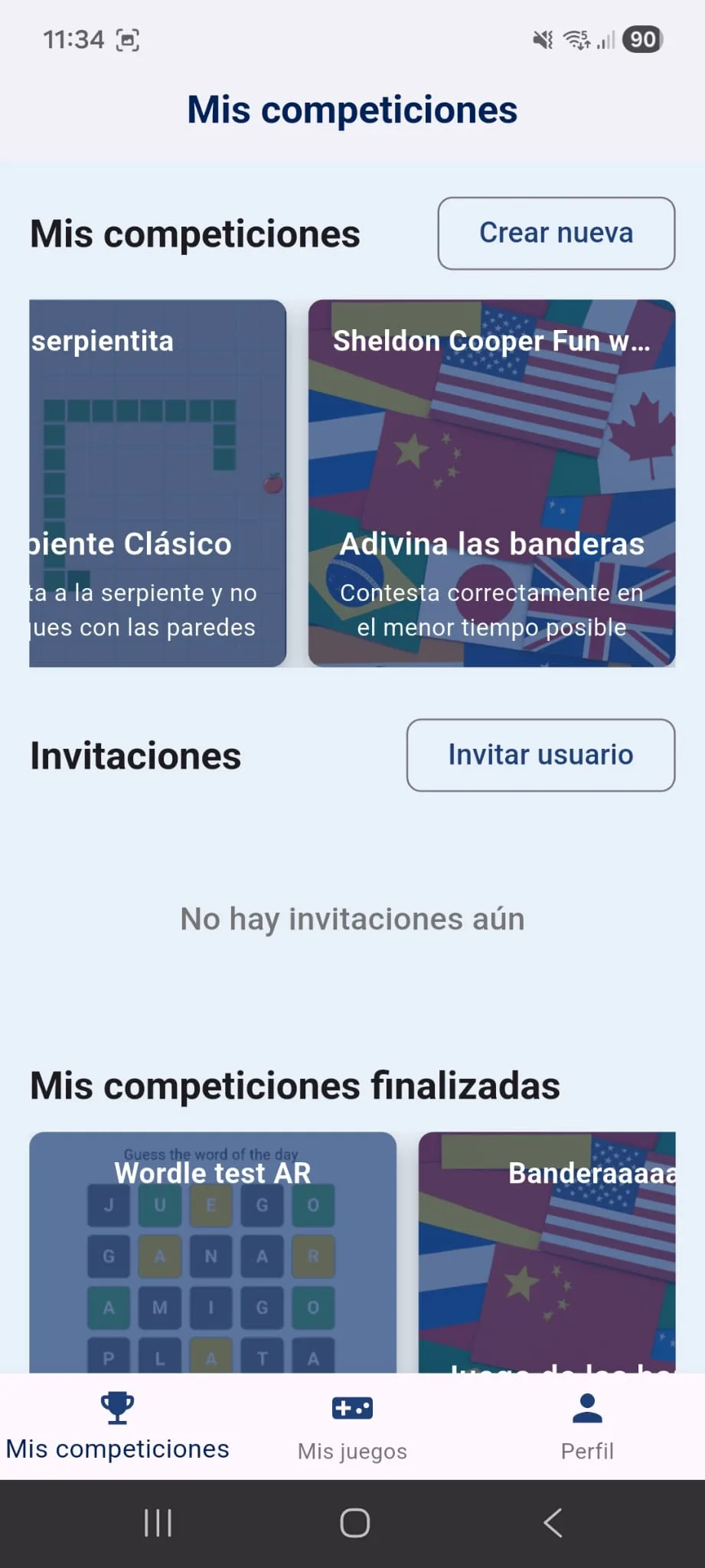
To start creating your community, you will see two prominent buttons: one to create a new competition from scratch and another to invite a user to a competition you already have running.
2. Creating the Perfect Tournament: Step-by-Step Setup
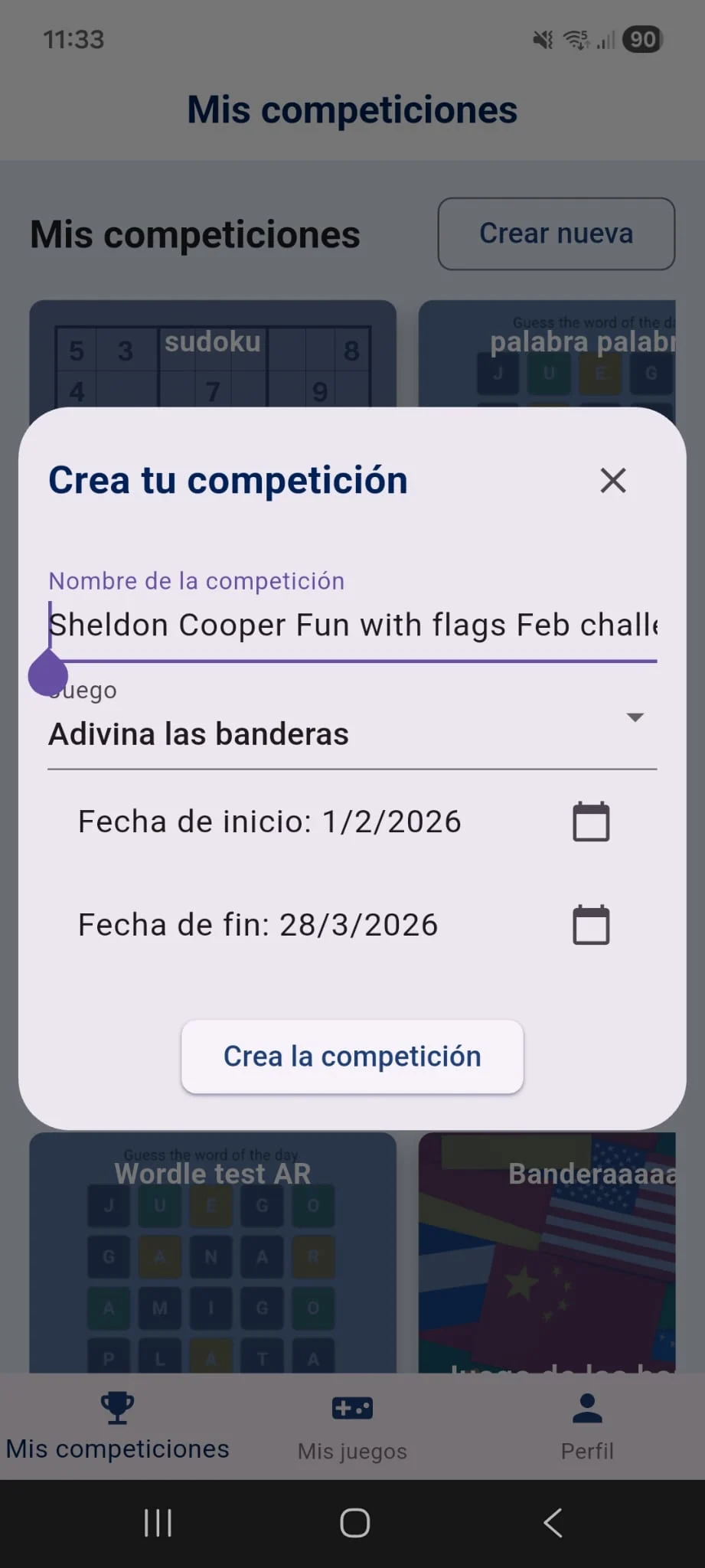
When you click the "Create new competition" button, you enter architect mode. It's not just about choosing a game; it's about designing an experience that motivates your friends to open the app every day.
The Name: Your personal brand
The name of the competition is the first thing your guests will see. A boring name like "Tournament 1" does not build excitement. Use names that encourage rivalry: "The Wordle Kings", "Who fears Minesweeper?" or "Cousins League 2026". Remember that this name will be engraved on the medals at the end of the event.
Game Selection
Each game in Single Games Arena offers a different type of challenge. Right now you can create competitions for:
- 2048 and 2048 Chrono: For lovers of math and mental speed.
- Classic Snake: A duel of pure reflexes.
- Sudoku and Minesweeper: Battles of pure logic and patience.
- Flags: Ideal for proving who is the most knowledgeable in the group.
- Wordle (The Word of the Day): One of our favorites. Here, knowledge, intuition, and consistency come into play. Unlike others, in Wordle every attempt counts and the score is adjusted according to your daily efficiency.
Timing: Start and End
Time management is crucial. The Start Date allows you to create the competition today but not have it start for a few days. Why is this useful? To give all your friends time to accept the invitation and start on equal footing. No one wants to join a tournament where the leader already has a 500-point advantage.
The End Date marks the moment of truth. When the deadline is met, the system closes the competition and the most rewarding moment occurs: the distribution of Gold, Silver, and Bronze medals. These medals are not just visual; they are saved in each player's profile, allowing them to complete their personal trophy cabinet. It is the ultimate honor in SGA.
3. Inviting Your Rivals: The Admin Role
The creator of the competition is automatically the Admin. This gives you the power to manage who enters the arena. You can invite friends from the general tab or from the details page of the competition itself.
You have two methods for recruiting:
- By Email: If you know your friend's email, the system will send them a direct notification. It is the most formal way to challenge someone.
- Invitation Link: Generating a link is, without a doubt, the most powerful option. You can copy and paste it into your WhatsApp or Telegram groups. Careful! These links expire after 24 hours to prevent outsiders from slipping into your private tournaments, but as Admin you can generate as many as you need.
4. Anatomy of the Competition: The Details Page
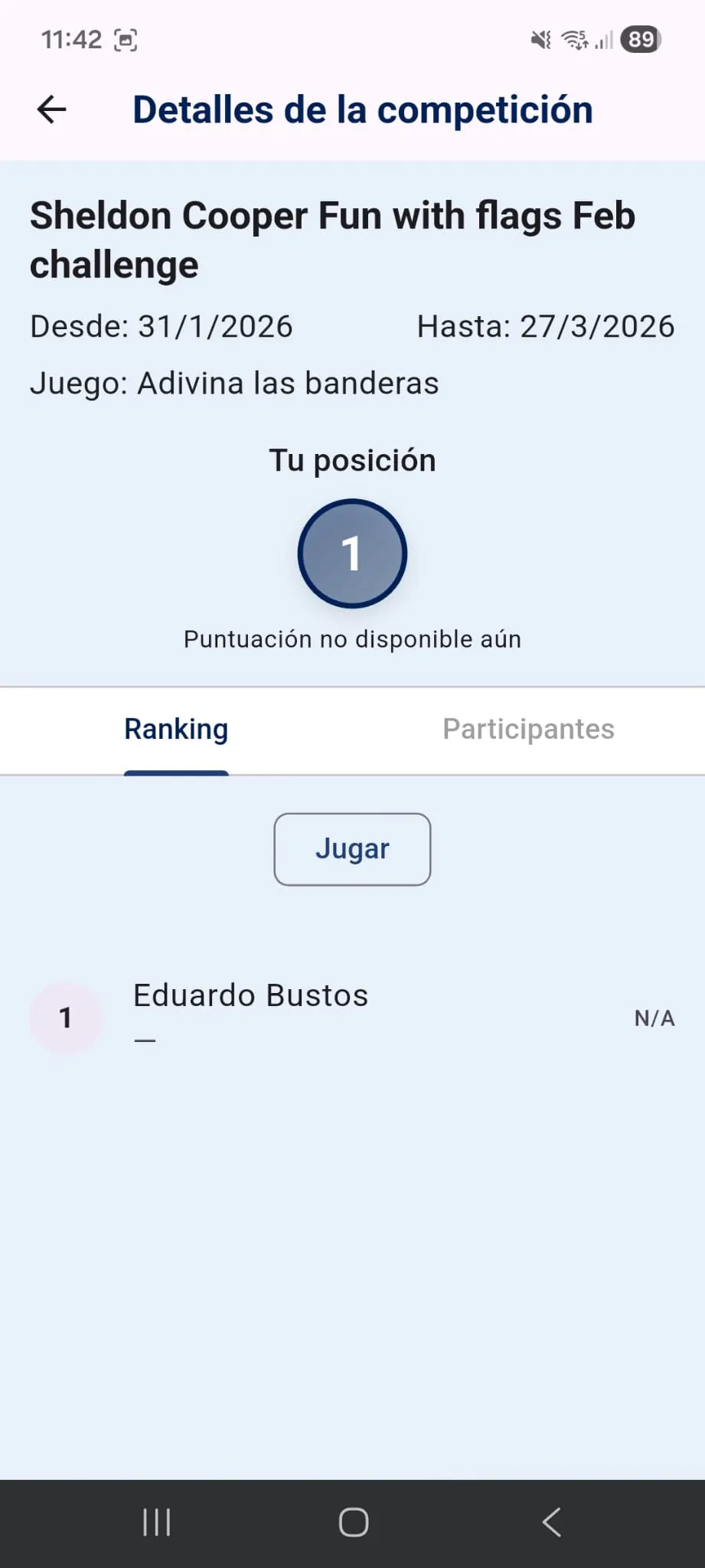
Once the competition is underway, you will spend a lot of time on the details page. At the top you will see a quick summary: the name, the game, how much time is left until closing, and your current position.
To manage information, the page has several strategic tabs:
Ranking Tab
This is the pure leaderboard. You will see your friends' names, their scores, and their order. The best part is that if you see someone is nipping at your heels, you have a direct "Play" button. Clicking it will take you directly to the corresponding game to try to improve your record and defend your position.
Participants Tab
Here you will see who has accepted the challenge and who is still "on the bench" (guests who haven't joined yet). You can also see who the league Admin is.
Stats Tab (Your personal analysis)
In games with aggregate scoring, like Wordle, this tab is your best ally. Here you won't see others' progress, but your own statistics within that competition. You can see a breakdown of how many times you guessed the word in 1, 2, 3, or more attempts. It is essential for detecting if you are losing momentum and need to concentrate more on your next daily moves.
5. Automatic Sync: You play, we calculate
One of the biggest advantages of Single Games Arena is that you don't have to worry about "uploading" your points. The system is completely intelligent:
- Best Score Games: If you beat your record in Minesweeper or Snake, the app automatically detects all the competitions for that game you are enrolled in and updates your position if your new mark is better than the previous one.
- Aggregate Score Games: In the case of Wordle, every daily game adds points. If you are playing in three different Wordle competitions (one with friends, another with family, and another from work), your score for the day will automatically be added to all three. One single effort, triple reward.
Ready to create your first league?
Don't let your skills get rusty playing only against the
machine. The true challenge lies in beating those who know you best.
Enter the My Competitions tab now and throw down the gauntlet. Which of your friends
will be the first to bite the dust?